For OnlyFans agencies

Every creator's content, from plan to post.

fangrowz turns each weekly plan into one card per piece, collects every clip your creators upload to Drive, and walks it through review, editing and scheduling. One Mac app for your whole team.

Apple Silicon and Intel. Windows is on the way.

fangrowz agency dashboard: delivery per creator, pieces to review and to redo, overdue customs and buffer days per account.
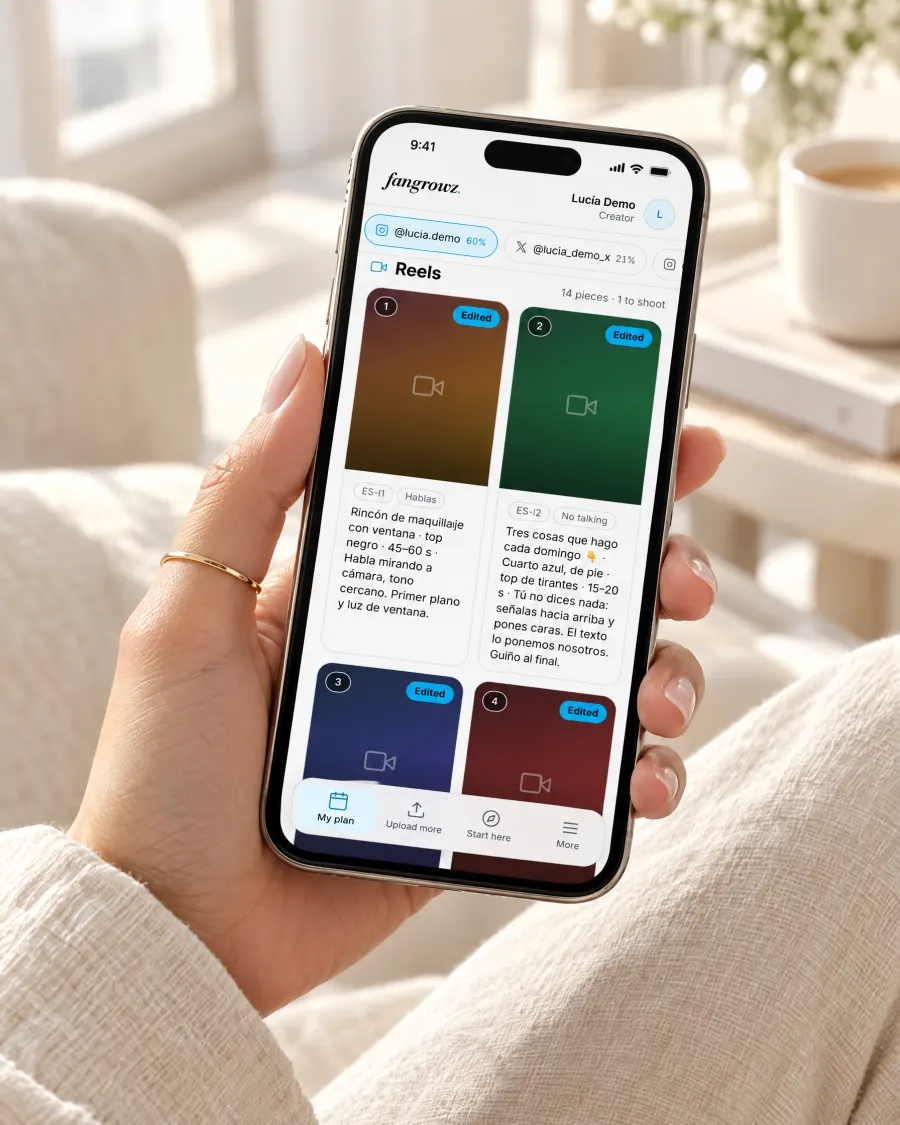
The creator's weekly plan on her phone, with an urgent custom request and a countdown.
carla-tips-143-2b.movRenamed and assigned to Reel 143
Weekly plan sent14 cards, one per piece
Custom due in 23:52Fan request · 24 h deadline
Every clip renamed and filedCreators upload without naming anything. fangrowz assigns each file to its piece.
Your Drive, your filesEverything stays in your agency's Google Drive. No public links, ever.
Five roles, one circuitAdmin, strategist, editor, OnlyFans team and creator. Each sees only their part.
Built for the phone tooCreators see their plan and upload from their phone. The team runs it from the Mac app.
The problem

WhatsApp, Drive folders and spreadsheets weren't built to run a content team.

Plans live in one file, clips in another folder, feedback in a chat nobody can find. fangrowz puts the whole week in one circuit, so every piece always has an owner and a status.

Before

Scattered across five apps

With fangrowz

One circuit, from plan to post

  1. Plan the weekExcel and a video walkthrough become one card per pieceRequested
  2. Creator shoots and uploadsStraight to her Drive folder, from her phoneUploaded
  3. Review the raw clipsOK, or redo with a reason she receives by emailRedo
  4. Editor delivers versionsYou approve or send back in one clickEditing
  5. Schedule and measureReady for Metricool, then winners from your metricsPublished
A MacBook on a travertine desk showing the fangrowz agency dashboard.
The whole agency at a glance.

Delivery per creator, what is waiting for your OK and how many days of content each account has ready.

What you run from it

Every step of a creator's week, in its own screen.

Weekly plan

Write the plan once. Every piece gets its card.

Upload the week's Excel, the link to your video walkthrough and its transcript. fangrowz creates one card per reel, carousel, story or OnlyFans post and attaches the right part of your explanation to each one.

  • A template per creator, with a tab for each account
  • Script, alternate openings and shot notes on every card
  • Social media and OnlyFans plans for every creator
In the app:New planMy plan
New plan wizard: choose creator, week and plan type, then add the Excel, video and transcript.
The creator's plan on her phone: reel cards with the brief for each one.
Uploads from the phone

She uploads. fangrowz files it.

The creator taps “Upload to Drive”, the Google Drive app opens in her own folder, she uploads her clips without renaming anything and taps “I've uploaded it”. fangrowz finds the new files, renames them, assigns them to the right piece and tells you.

  • Files identified by their Drive ID, never by name
  • Duplicates and low-quality clips flagged on arrival
  • Anything it can't place goes to “Unassigned”, never lost
In the app:My planUnassignedUpload more
A creator filming a vertical video with her phone on a tripod in a bright studio.
A hand holding a phone with the creator's plan open in fangrowz.
IMG_4821.MOV→carla-tips-143-2b.mov
Review

OK it, or ask for a redo with the reason.

Watch each raw clip next to what you asked for. One tap sends it to the editor, or back to the creator with a reason she receives by email. Wrong piece? Move it and fangrowz renames it in Drive.

  • The brief and the reference beside every clip
  • Reels go to the editor, photos and stories straight to ready
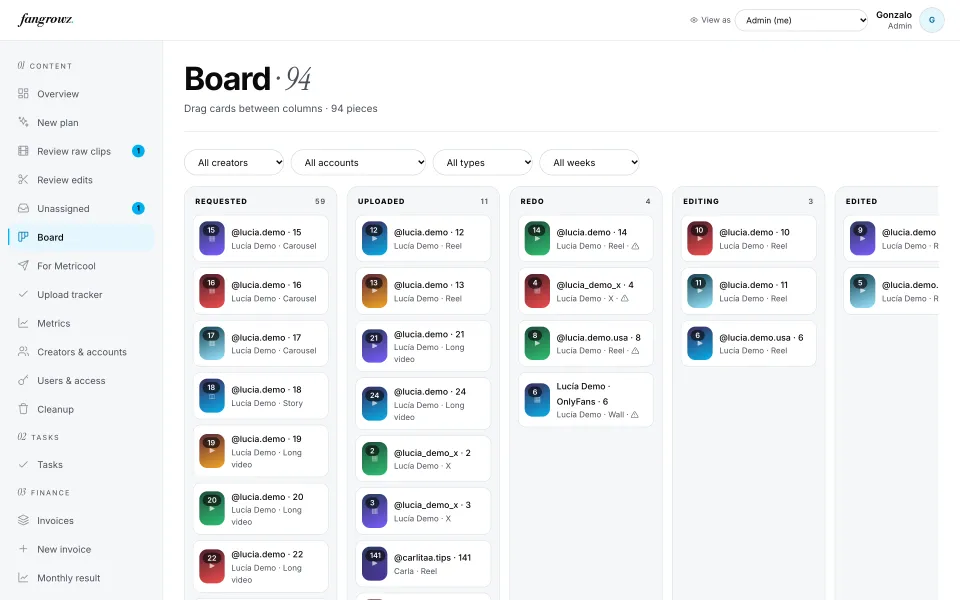
  • A board with every piece by status, from requested to published
In the app:Review raw clipsBoard
Review raw clips: the clip, what was requested, and the OK and Redo buttons.
OK · sent to the editorReel 141 · @carlitaa.tips
Editing

Your editor's queue, sorted by deadline.

The editor sees only the pieces that need editing, with the raws in order, the brief and the hooks. They drop the versions in the Edited folder and tap “Done”. You approve them or send them back with a note.

  • Several versions per piece, each with its own hook
  • Editing guides per format, always at hand
  • Pay per approved piece, calculated week by week
In the app:My queueReview editsMy payments
An editor at a MacBook reviewing edited versions in fangrowz.
The editor's queue: reels to edit sorted by due date.
2 versions deliveredWaiting for your approval
Scheduling and metrics

Ready for Metricool. Then find the winners.

Everything approved lands in one list: download the video, copy the caption, schedule it in Metricool and mark it done. Import Metricool's CSV and fangrowz matches every post, marks the winners against each account's average and lets you order new versions of them.

  • 24 h, 72 h and 7 day windows per account
  • Winners: more than twice the account's average
  • “Order versions” sends a repurposing job to the editor
In the app:For MetricoolMetricsRepurposing
For Metricool: approved videos with download, copy caption and “In Metricool” buttons.
Metrics: average views per account and the winning posts highlighted.
OnlyFans team

Customs on time, every time.

Your chatters request a custom with the fan, the brief, the price and a 24 or 48 hour deadline. The creator sees it at the top of her plan with a countdown. The team follows it from requested to delivered, and plans OnlyFans stories phase by phase.

  • Countdown and an overdue alert for every custom
  • Stories by phase and wall photos in one place
  • The OnlyFans team never sees social media, and the editor never sees OnlyFans
In the app:CustomsOF content
Customs: each fan request with its price, deadline and progress.
17 h 53 min leftCustom #1 · 24 h
And the rest of the agency

Tasks, uploads, invoices. All in the same app.

The board: every piece in columns by status.
Board

Every piece of the week in eight columns, from requested to published. Drag to move.

Upload tracker: a daily checklist per creator and time slot.
Daily upload tracker

What has to go out today, per account and time slot, ticked in one tap.

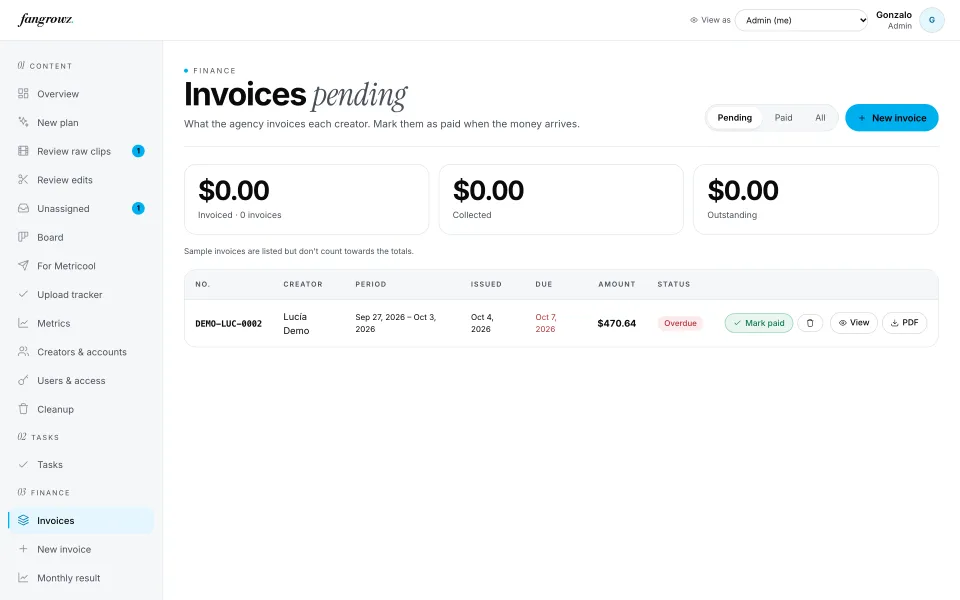
Invoices to creators with their status.
Invoices

Issue each creator's invoice from her OnlyFans statement and track what is paid.

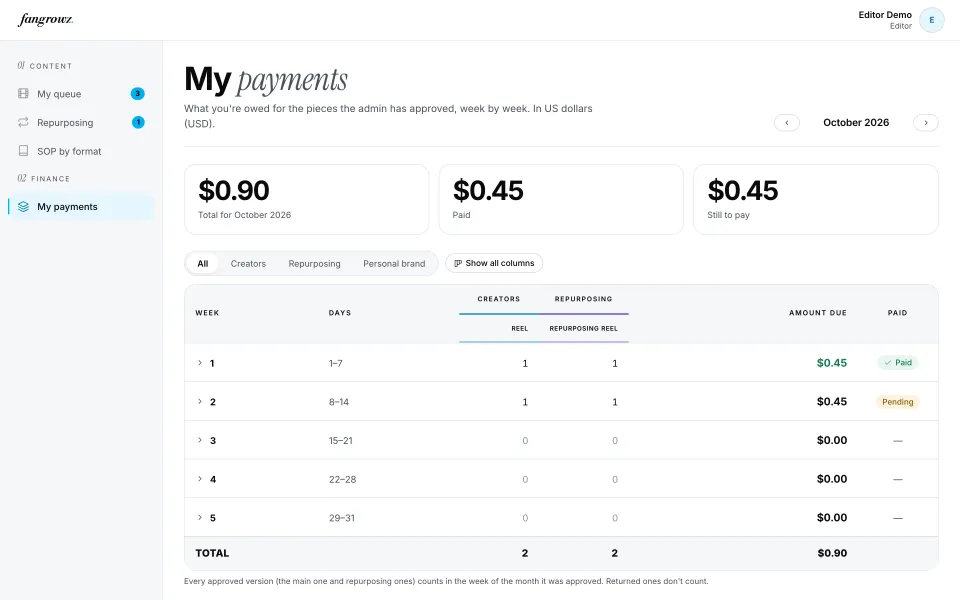
Editor payments by week and type.
Editor payments

What you owe per approved piece, week by week, with your own rates.

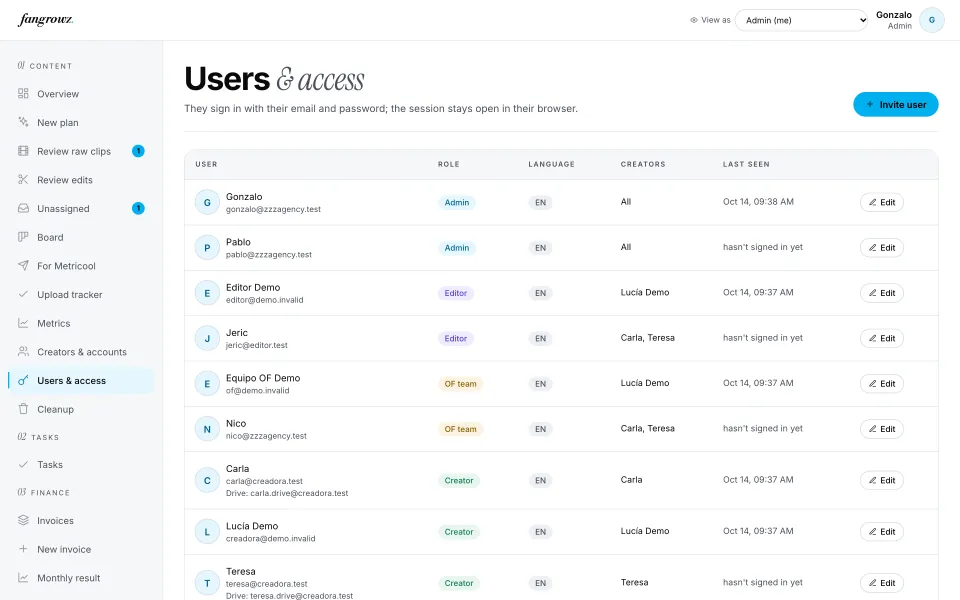
Users and access: role, language and creators for each person.
People and access

Invite your team and creators, each with their own login, role and language.

How it works

Up and running in three steps.

1

Download the app

Install fangrowz on your Mac. Apple Silicon and Intel are supported.

2

Invite your team and creators

Each person gets their own login and role. Each creator gets her own Drive folders, shared only with the people who need them.

3

Send the first weekly plan

Upload the Excel and the walkthrough. Your creators get an email and see their plan on their phone.


Security and privacy

Sensitive content stays yours.

fangrowz was designed for OnlyFans content from day one. Files live in your agency's Google Drive and every person sees only what their job needs.

Files stay in your Google Drive

Clips are stored in the agency's Drive and identified by their Drive ID. Viewing them in the app needs no Google login.

No public links, ever

Nothing is shared with “anyone with the link”. Access is given per person and per folder.

Permissions checked twice

Each role only sees its own part, and the database checks it again on every action, not just the screen.

“View as”, read only and logged

An admin can see the app exactly as a creator or editor sees it, without being able to change anything. Every time is recorded.

Who sees whatBy role
SocialOnlyFansFinance
Admin
Strategist
Editor
OnlyFans team
CreatorOnly her own plan, uploads, tasks and invoices
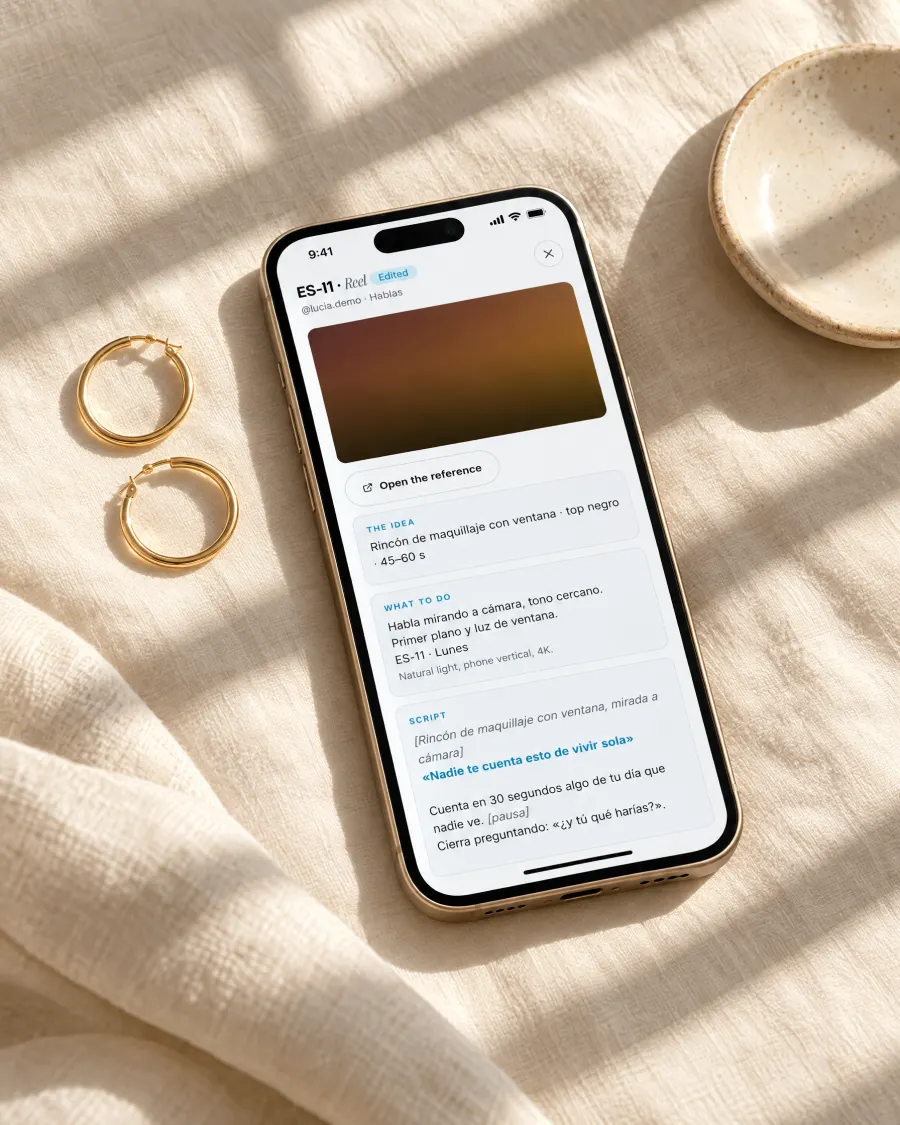
A phone on linen showing a piece's brief in fangrowz.
What you need

Nothing new for your creators.

Your team uses the Mac app. Creators only need their phone and the Google Drive app they already have.

TeamA Mac (Apple Silicon or Intel)
SystemmacOS pendiente: versión mínima
CreatorsAny phone with the Google Drive app
StorageYour agency's Google Drive
SchedulingMetricool (optional, for posting and metrics)
Pricing

Simple pricing, per creator.

pendiente de Pablo: modelo de precio, importes y prueba gratis

Plans are being finalised.

Tell us how many creators you manage and we'll set you up. Book a call and we'll walk you through the app with your own workflow.


FAQ

Questions before you download.

Is our content safe?

Your files never leave your agency's Google Drive and are never shared through public links. Access is given person by person and folder by folder, and each role only sees its own part.

Do creators have to install anything?

No. Creators open their plan on their phone and upload with the Google Drive app. They don't rename files: fangrowz does it for them.

Is there a Windows version?

The Mac app comes first, for Apple Silicon and Intel. Windows is on the way.

Does it post to Instagram or TikTok for us?

No. fangrowz prepares everything that is approved so you can schedule it in Metricool in seconds, and reads your Metricool metrics back to find the winners.

Does it open OnlyFans or handle chats?

No. fangrowz runs content production: plans, uploads, review, editing, scheduling, customs and finance. It never logs into a creator's OnlyFans account.

What languages does it speak?

English and Spanish. Each person uses the app and receives emails in their own language.

How much does it cost?

Pricing is being finalised. Book a demo and we'll tell you what it costs for your number of creators. pendiente de Pablo

Give your content team one place to work.